
The useful question is what kind of help you need. During a call, you may know the material but need a starting point. Before a call, you may need to practise explaining your experience. Interview Copilot has separate paths for those tasks: Copilot suggests answers; Coach gives feedback on answers you say aloud.
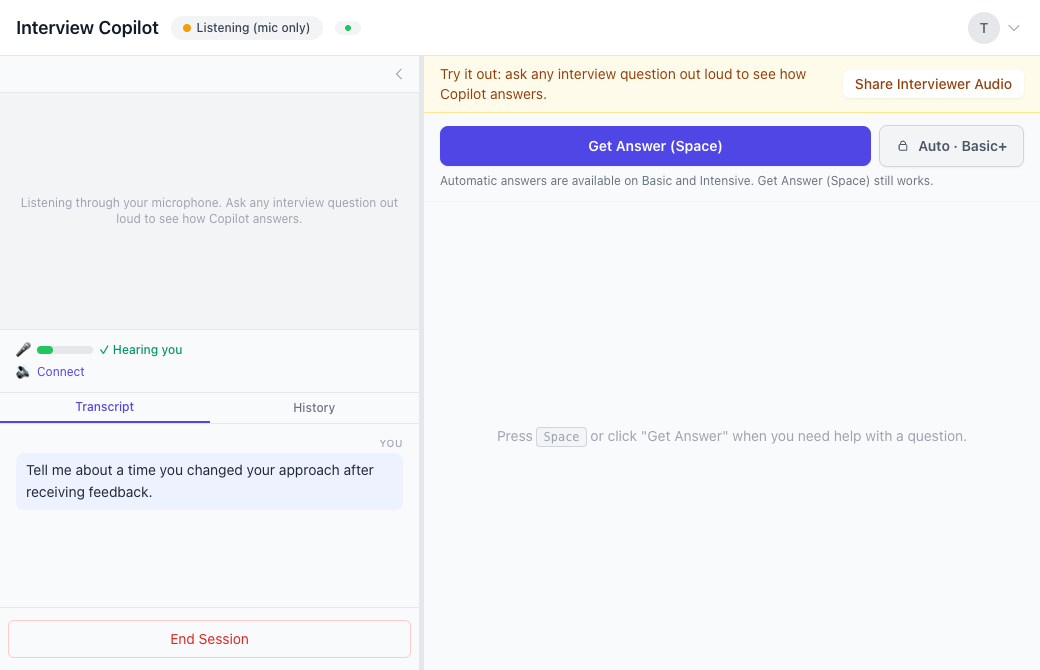
What happens during a live call
Open Web Copilot beside your call and add the role, résumé and job description you want it to consider. Connect the interviewer-audio route available in your setup. When the interviewer speaks, check that the question reaches the transcript. Then request guidance with Get Answer.
Manual Get Answer is available on every plan. In Web Copilot, the site documents Space as the answer key. Basic and Intensive also include optional Auto Answer, which starts a suggestion when a question ends. You can switch Auto Answer off and choose when to request help yourself.
Audio setup matters before any of that becomes useful. Hearing yourself through your microphone does not establish that Copilot can hear another participant. Use a test call with another speaker and your intended headphones, browser and operating system. The live answers guide separates the audio check from the answer request.
Choose how much wording you want
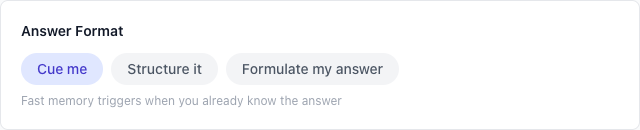
Interview Copilot offers three answer formats:
- Cue me: short points to prompt an answer you already understand.
- Structure it: an outline that orders the reasoning and supporting details.
- Formulate my answer: a full first-person draft to work from.
Start with the amount of text you can use comfortably while listening. A few cues may be enough for a familiar project. An outline may help when a question asks you to explain a decision and its trade-offs. Full wording gives you more text to inspect, including any detail that needs correcting.
The format does not make an invented achievement true. Your experience is the source you must be able to defend. If a suggestion introduces a result, responsibility or number you did not provide, leave it out.
Worked example: recover the decision in your story
Here is a writer-created exercise, not a customer transcript or recorded product output.
Question: “Tell me about a time you changed your approach after receiving feedback.”
Your factual notes: You owned an onboarding flow. Support colleagues said the instructions were confusing. You watched three internal walkthroughs, rewrote the instructions and asked colleagues to repeat the task. You did not measure a conversion change.
For a cue-style answer, the useful reminders would be: the original approach, the feedback, what you personally changed, and what you learned from the repeat walkthrough. An outline could arrange those same facts into situation, action and observation.
A defensible answer might say: “I thought the instructions were clear until support showed me where people hesitated. I watched colleagues try the flow, rewrote the confusing steps and ran another walkthrough. That changed how I check whether an explanation works.” Do not add a conversion increase to make the ending sound impressive. The example works because each sentence has a fact behind it.
Browser and Mac options
Web Copilot runs without installation. For a call in a browser tab, the documented path is tab audio in desktop Chrome or Edge. For a native Zoom, Teams or Webex app, Web Copilot uses entire-screen audio through Chrome on Windows, or macOS 14.2 or later with Chrome 141 or later.
Prep Notes is Interview Copilot's Mac app. It uses macOS system audio with permission and offers a setup test tone. It requires Apple silicon, M1 or later, and macOS 13 Ventura or later; there is no Intel build. It uses the same account, plan and Copilot minutes. See the Mac requirements before choosing this route. The documented Get Answer shortcut is Option–Space, with Shift–Command–Space as a fallback if another app uses it.
On Free, Copilot starts with your microphone. During the session, Share Interviewer Audio adds your call tab in Chrome or Edge on a computer. Ask a question aloud first to judge the guidance, as our evaluation guide describes.
What is free, and when does Coach fit?
Free includes 20 Copilot minutes and 20 Coach minutes each month, with no card needed to start. They are separate allowances. Paid monthly plans are Light at US$14.99, Basic at US$19.99 and Intensive at US$29.99. The pricing page explains the different minute allowances.
Coach is included on every plan. In behavioral and hiring-manager Practice mode, you answer aloud, receive one focused correction and retry the same question. Use AI interview practice when the part you need to improve is your explanation. Use Copilot when you want guidance on the question itself. Neither path predicts whether you will receive an offer.
Frequently asked questions
Is an AI interview helper the same as an AI interview assistant?
On this page, both describe help for the candidate: guidance on questions during a call. Check the actual workflow, because the name alone does not tell you how audio connects or how answers are requested.
Does Interview Copilot answer automatically?
You can use Manual Get Answer on every plan. Basic and Intensive add optional Auto Answer after a question ends. You still decide what to say and check personal details.
Can I use it without installing an app?
Yes. Web Copilot runs in a browser. Direct call-audio capture depends on the browser, operating system, call location and the connection you use.
How much can I try for free?
The published Free plan includes 20 Copilot minutes and 20 Coach minutes every month. On Free, Copilot starts with your microphone. During the session, Share Interviewer Audio adds your call tab in Chrome or Edge on a computer.
Can it guarantee a correct answer?
No. AI can be wrong, and supplied context is not proof of your achievements. Check the suggestion, use your own words and follow the rules of your interview.
Try Copilot free. Return to Interview Copilot for the current product overview.