
For a Microsoft Teams interview, Interview Copilot provides question-based guidance after you connect a supported call-audio source. Use tab audio when the meeting runs in a browser, or the documented system-audio route when it runs in the Teams desktop app.
Check meeting access before setting up assistance. Joining the employer's meeting and connecting its audio to Copilot are two different checks. A sign-in request or lobby restriction is a meeting-access issue; an empty Copilot transcript is an audio issue to investigate after you can hear the call.
Check how you will join Teams
Microsoft documents browser joining through Chrome or Edge using “Continue on this browser.” Its guidance also says meeting settings can affect joining without an account, and some meetings require identity verification or an account. Read the Microsoft joining guidance and follow the invitation's requirements.
Use a test meeting to settle whether you will use the browser or desktop app. If a work-managed computer prevents a required audio permission, do not assume changing a Copilot setting will remove that restriction. Resolve your supported setup before the interview rather than attempting a new route during it.
Prepare Interview Copilot
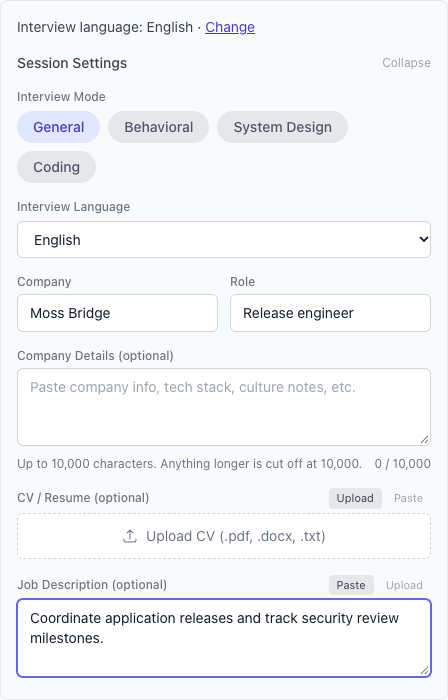
Open Interview Copilot and add the role, résumé and job description you want considered. Remove confidential material and personal contact details that are not needed for the exercise. Choose the interview mode that matches the round: general, behavioral, system design or coding.
Check your remaining allowance. Free includes 20 Copilot minutes and 20 Coach minutes monthly. On Free, Copilot starts with your microphone. During the session, Share Interviewer Audio adds your call tab in Chrome or Edge on a computer.
Teams in a browser: connect the meeting tab
- Join the test meeting in desktop Chrome or Edge. Complete any required sign-in or verification and confirm you can hear another participant.
- Open Web Copilot in a second tab and begin the session setup with your selected mode and context.
- Select the tab containing the Teams meeting and enable tab audio in the browser's chooser.
- Ask another participant to speak a complete question. Check the actual words in Copilot's transcript, including the end of the question.
- Use Get Answer and inspect the resulting guidance. Keep the transcript check separate from judging the content of the answer.
Do not select the invitation email or calendar tab: it contains the meeting link, not the running conversation. If you change from browser Teams to desktop Teams, return to the source-selection step and use the desktop route below.
Teams desktop app: connect system audio
For browser-tab and desktop-call audio routes and Prep Notes requirements, see browser and Mac audio setup.
- Join the Teams test call in the desktop app and verify the other participant's voice.
- Open Web Copilot in Chrome and begin the session setup.
- Start the interviewer-audio connection and choose entire-screen audio. A browser tab unrelated to the desktop meeting will not supply the Teams call.
- Have another participant ask a question. If the words do not reach the transcript, check the selected source and audio option before generating an answer.
- Repeat the spoken check after changing the device or call route you intend to use.
Rehearse a panel question with a changed constraint
This writer-created exercise is useful when your Teams interview will include more than one interviewer. It is not a claim that Copilot identifies individual speakers.
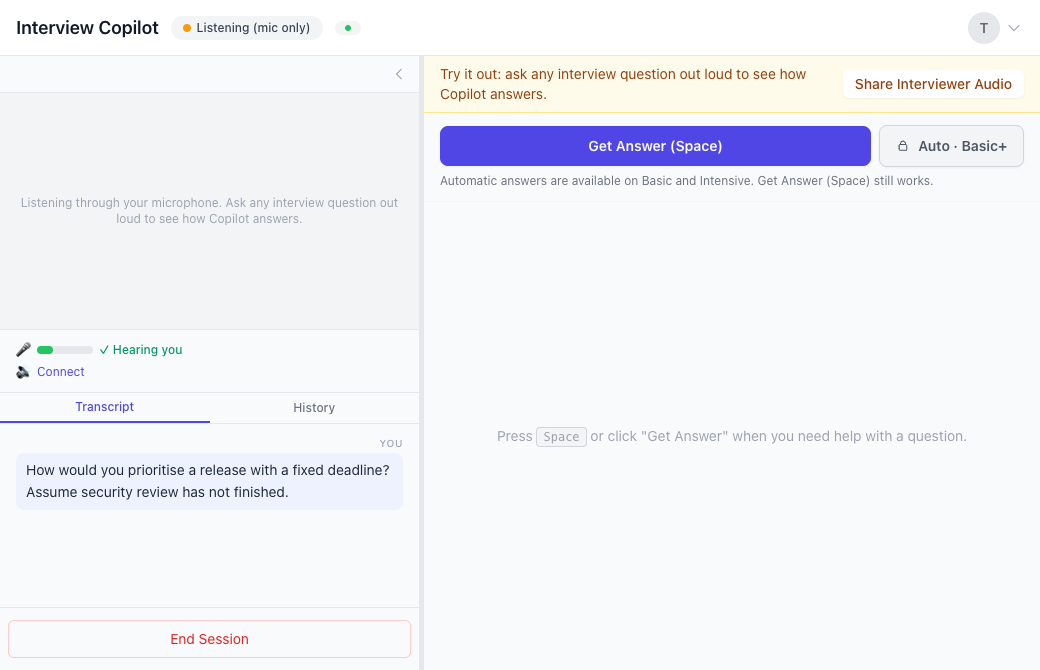
Ask one partner to say: “How would you prioritise a release with a fixed deadline?” Ask a second partner, or the same person after a pause, to add: “Assume security review has not finished.” Wait for both parts in the transcript before requesting guidance.
Read the answer for the changed constraint. A response about moving minor features to a later release does not fully address an unfinished security review. You may need to state what must be resolved, explain the trade-off or ask a clarifying question before proposing a release plan.
The exercise checks whether you have the relevant words and can use the suggestion thoughtfully. It does not establish automatic speaker attribution, perfect transcription or judgment on your behalf. Keep listening to the panel and correct the premise when needed.
Pick the answer format before the real meeting
Interview Copilot offers Cue me, Structure it and Formulate my answer. Try a short cue for a familiar question and an outline for a multi-part decision. Full first-person wording is available when you want a draft to inspect.
Manual Get Answer is available on every plan. Basic and Intensive add optional Auto Answer after a question ends. Learn the live-answer controls before the meeting, and use Coach practice to rehearse answers aloud beforehand.
Frequently asked questions
Can I join Teams in a browser and use Web Copilot?
Microsoft documents browser joining in Chrome or Edge, subject to meeting requirements. For Web Copilot, connect the running meeting tab with tab audio.
What if Teams asks me to sign in?
Follow the meeting's identity requirements. Microsoft says joining without an account depends on meeting settings. Copilot does not replace that access step.
Does the Teams desktop app use tab audio?
Use the documented system-audio route for the native app: Chrome entire-screen audio on supported systems, or Prep Notes on a supported Mac. An unrelated browser tab is not the call source.
Does Copilot identify everyone on the panel?
This guide does not establish speaker identification. Its panel exercise checks the captured question and changed constraint, not attribution to named people.
Can I test with Free?
Free provides 20 Copilot minutes and 20 Coach minutes a month. On Free, Copilot starts with your microphone. During the session, Share Interviewer Audio adds your call tab in Chrome or Edge on a computer.
Try Copilot free. See AI interview assistant for the broader workflow.