
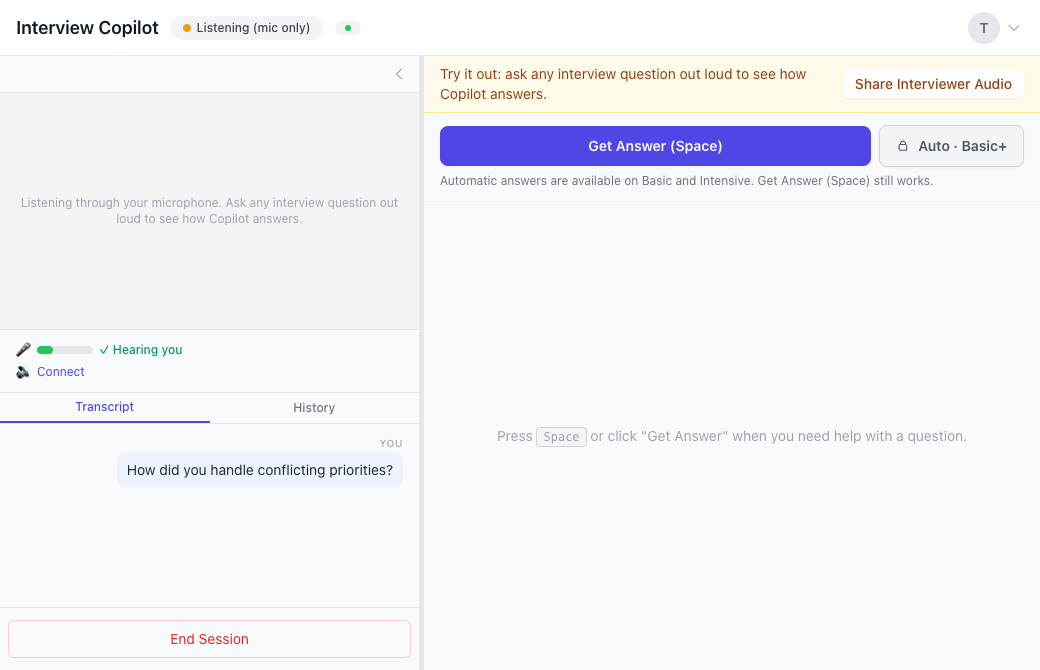
Live AI interview answers are suggestions generated from questions spoken during a call. Interview Copilot listens through a supported audio connection, puts the question in a transcript and provides guidance when you use Get Answer or enable Auto Answer on an eligible plan.
If you are looking for AI that listens to interview questions and answers, check three separate things: what audio it receives, when it generates a response and how it presents the text. A transcript is evidence of captured speech; it is not evidence that the generated answer is correct.
Step 1: give the answer relevant context
Add the role, résumé and job description you want Copilot to consider. The current product description also includes your stories, company and conversation context. Use facts you can substantiate and remove confidential details that are not needed.
Before testing, write a rough answer of your own to a familiar question. That gives you something concrete to compare with a suggestion. If the output adds a result you never measured, a project you did not work on or a responsibility someone else held, remove it rather than treating polished wording as proof.
Step 2: connect the question's audio source
For a call running in a browser tab, Web Copilot's documented route is tab audio in desktop Chrome or Edge. For native Zoom, Teams or Webex apps, use Chrome entire-screen audio on Windows, or macOS 14.2 or later with Chrome 141 or later.
Prep Notes, the Mac app, uses macOS system audio with permission and offers a setup test tone. It requires Apple silicon, M1 or later, and macOS 13 Ventura or later, with no Intel build. See the Mac requirements before choosing that route.
Use the platform-specific Zoom, Teams or Google Meet guide for the setup sequence. Select the source carrying the actual question, then confirm another speaker's words in the transcript.
On Free, Copilot starts with your microphone. During the session, Share Interviewer Audio adds your call tab in Chrome or Edge on a computer.
Step 3: request an answer after checking the transcript
Manual Get Answer is available on every plan. The Web Copilot walkthrough documents Space as the answer key. Check the question first, then request guidance; do not assume a suggestion can recover a requirement that never arrived in the transcript.
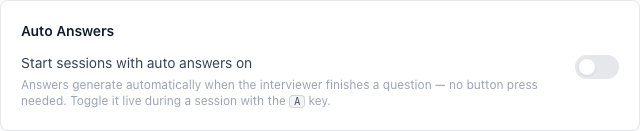
Basic and Intensive add optional Auto Answer. It begins a suggested response after an interview question ends and can be switched off. Auto Answer changes when generation starts. It does not remove the need to inspect the premise, read the answer or decide what to say.
In Prep Notes, the documented shortcut is Option–Space, with Shift–Command–Space as a fallback if another app already uses it. Web and Mac shortcuts are different. Test your chosen control in the setup you intend to use rather than assuming a web key works from every application.
Step 4: choose one of three answer formats
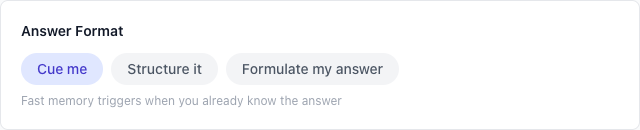
Cue me gives short points to glance at. It is the default format described on the current site. Use it when you recognise the material and need reminders rather than a complete draft.
Structure it arranges the answer and proof points. Use it to check whether you have a direct answer, supporting action and result in an order you can explain.
Formulate my answer provides full first-person wording. Treat it as a draft to inspect. Any claim about your experience still needs to be true, even when it sounds natural in a finished sentence.
The site says you can change the format in settings. Choose the amount of text that helps you follow the conversation; more text also gives you more to read and check.
One question, three possible presentations
The following is writer-created teaching material, not recorded product output or a customer result.
Question: “How did you handle conflicting priorities?”
Factual context: You owned an internal dashboard. Two teams wanted changes in the same week. You checked which deadline had an external dependency, agreed the order with your manager and moved the other request to the following week. You have no measured revenue result.
A cue-style presentation could remind you: external dependency; agree the order; explain the delay; deliver the first request. An outline could separate the prioritisation rule, your action and what happened next.
A full draft might say: “I checked what would be affected if each request waited. One team had an external deadline, so I agreed with my manager to handle that request first. I explained the decision to the other team and moved its change to the following week.” The same facts support all three presentations. None needs an invented percentage improvement.
Now ask: “What would you do if both deadlines were external?” That changes the decision. Listen to the follow-up and check that the next suggestion addresses the new constraint rather than repeating the original answer.
What listening does not establish
A captured question can still contain a transcription error. A relevant-looking answer can still include an unsupported detail. A good response to one question does not prove that the setup will capture every call or that you can explain a new technical topic.
Use a test with your intended device, audio route and language. Inspect complete answers and try follow-ups. Use assistance within the interview's rules. For feedback on how you answer aloud, use Coach practice before the call.
Frequently asked questions
Does Interview Copilot listen and answer automatically?
It receives speech through the audio source you connect. Manual Get Answer is available on every plan; Basic and Intensive add optional Auto Answer after a question ends.
What is the Get Answer key?
The web walkthrough documents Space. Prep Notes documents Option–Space, with Shift–Command–Space as a fallback. Test the actual control in your chosen setup.
What are the three answer formats?
Cue me provides short reminders, Structure it gives an outline and proof points, and Formulate my answer gives full first-person wording. You can change the format in settings.
Does Free let me try spoken questions?
Yes. Free includes 20 Copilot minutes and 20 Coach minutes each month. On Free, Copilot starts with your microphone. During the session, Share Interviewer Audio adds your call tab in Chrome or Edge on a computer.
Are the answers guaranteed to be accurate?
No. AI can be wrong. Check the captured question and every factual claim, use your own words and be ready to explain a follow-up.
Try Copilot free. See pricing for allowances and the Interview Copilot overview for the current offer.