
Verve AI is an interview assistant whose public site describes automatic question detection, answers informed by your materials and browser, Mac and Windows access. Interview Copilot is an alternative with Manual Get Answer on every plan, three answer formats and separate monthly allowances for live Copilot and spoken Coach practice.
This page is written by the makers of Interview Copilot. Verve AI at vervecopilot.com is a separate product. We checked public pages on 23 November 2026; we did not run a competitor session or benchmark the products. Check your employer's rules before using any interview assistance.
Published offers and platform differences
Checked on .
| Decision | Verve AI | Interview Copilot |
|---|---|---|
| Free access | Pricing page lists three 15-minute Copilot sessions a month and five mock interviews; no card needed | 20 Copilot minutes and 20 Coach minutes every month; no card needed |
| Paid offer | Advertises Standard from US$16.99/month and Pro from US$34.99/month, billed annually | Light US$14.99, Basic US$19.99 and Intensive US$29.99, billed monthly |
| Desktop access | Mac app supports Apple silicon and Intel; Windows page lists Windows 10 and 11 | Prep Notes requires Apple silicon, M1 or later, and macOS 13+; no Intel build; Windows app in progress |
| Live-answer workflow | Homepage describes automatic question detection and response suggestions | Manual Get Answer on every plan; optional Auto Answer on Basic and Intensive |
| Preparation | Pricing page advertises AI mock interviews | Coach included on every plan, with minutes varying by tier |
| Sources | Pricing, workflow, Mac, Windows | Plans, assistant, Mac download, practice |
Verve's displayed paid starting figures are annual-billing equivalents, not established month-to-month prices. Its pricing page opens with annual billing selected, and the page description explicitly identifies that billing term. Check the actual purchase before comparing its total with one month of Interview Copilot.
There is also an unresolved allowance conflict. Verve's Standard card lists sixty 60-minute sessions, while the comparison table lists five sessions. We have not chosen one as the entitlement or calculated a cost per session. A billing choice needs a consistent allowance as well as a price.
What Verve's public pages establish
Verve describes a preparation step where you supply a résumé, job description and other materials, followed by automatic question detection during an interview. Its Copilot page says it listens in real time to catch questions, lists behavioral, coding, technical and case interviews among its uses, and uses your résumé, job description and notes to help shape structured answers. The pricing page describes live transcription and generated responses.
That establishes the advertised workflow. It does not establish how reliably an exact headset and meeting-app combination will connect, or whether a generated answer will represent your experience accurately. This comparison does not claim a particular browser version, microphone/system-audio routing sequence or minimum Mac operating system for Verve because those details were not established from the pages checked.
If Intel Mac support is central to your choice, Verve explicitly lists it. Interview Copilot's Prep Notes app does not support Intel Macs. Its browser route remains a separate option whose audio requirements need checking. Keep app compatibility and browser compatibility as separate questions.
How Interview Copilot differs
Interview Copilot gives you an explicit request control on every plan. Wait for the question in the transcript, then use Get Answer. Basic and Intensive add optional automatic requests after a question ends. You can choose cues, an outline or full wording:
- Cue me: short reminders to help you form the answer.
- Structure it: the order of the explanation and supporting points.
- Formulate my answer: first-person wording to inspect and adapt.
The AI interview assistant guide explains that sequence. A longer answer is not automatically more useful: choose the amount you can work with while listening, and remove any personal claim you cannot substantiate.
Web Copilot's call-tab route uses desktop Chrome or Edge. Prep Notes takes Mac system audio with permission and uses the same account, plan and Copilot minutes. See the download requirements and Zoom guide before deciding which route fits your call.
A two-answer evidence audit
Use this writer-created exercise to evaluate an allowed trial. It is not a transcript, a competitor output or a measured claim about either product.
Prepare two factual notes about one project. First: you changed a support handover document after colleagues reported missing information. Second: the team adopted the document, but you did not measure a change in response time.
Ask: “What did you change, and how do you know it helped?” Check the answer in two passes. In the first pass, underline the action you personally took. In the second, mark the evidence for the result. A statement about adoption is supported by the notes. A percentage improvement in response time is not.
Now ask: “What would you measure if you repeated the project?” The answer should treat a proposed measurement as a future check. It should not quietly turn that proposal into a past achievement. Record any invented number or responsibility before judging how smooth the wording sounds.
Repeat the exercise with the request control and answer format you expect to use. If you need frequent manual timing, test that requirement directly. If you need automatic suggestions, assess whether they arrive after the complete question. A feature list alone cannot answer either fit question.
Practice the explanation before the interview
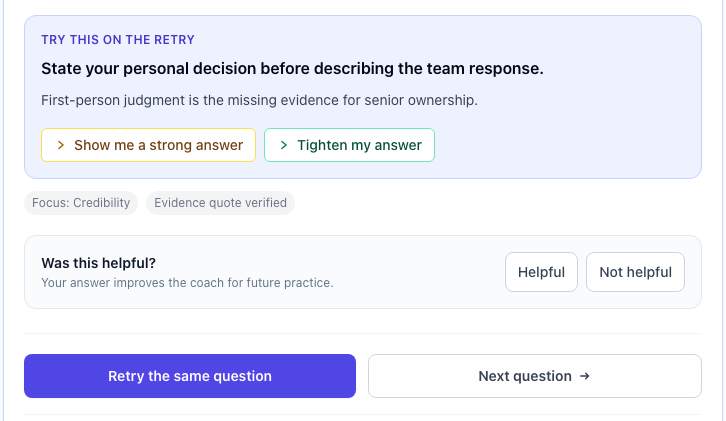
Interview Copilot's Coach works on answers you say aloud. Behavioral and hiring-manager Practice mode provides one focused correction and a retry of the same question. Mock interview mode offers a continuous run with feedback afterwards.
Free includes twenty Coach minutes monthly. Only answer-recording time counts toward Coach usage; reading feedback does not. Coach does not record video, and its technical practice is spoken rather than a code editor. Use it to improve the explanation you can give yourself, without treating a score as a hiring prediction.
Frequently asked questions
Is Verve AI free?
It publishes a free plan with three 15-minute Copilot sessions a month and five mock interviews, and says no card is required. This page does not infer additional usage beyond that offer.
Are Verve's displayed paid prices monthly subscriptions?
The advertised starting figures used here are monthly equivalents billed annually. We have not verified month-to-month totals or checkout.
Does Verve AI have a Mac or Windows app?
Yes. Its Mac page lists Intel and Apple silicon support; its Windows page lists Windows 10 and 11. We have not established a minimum Mac OS version here.
Can Interview Copilot wait for me to request an answer?
Yes. Manual Get Answer is on every plan. Auto Answer is optional on Basic and Intensive. The three formats control how much wording you receive.
Which product gives more accurate guidance?
This public-source comparison cannot establish that. Use factual context and follow-ups to check the guidance, and keep missing evidence separate from confident wording.
Try Copilot free. Compare another workflow in our ParakeetAI comparison or Final Round comparison.