
An AI interviewer is an automated part of an employer's screening process, which may ask you to record answers or hold a spoken question-and-answer interview. Prepare by checking the invitation and employer's rules, testing the required equipment and practising specific answers aloud before you start.
This guide is for the candidate facing the assessment. A one-way video response and a conversation with an AI voice are different formats. Establish which one your invitation describes before planning around a timer, a retry or a follow-up.
Find out what your actual interview requires
Read the invitation and the assessment's instructions before opening a practice tool. Make a short list:
- Is this a recorded response to a prompt or a spoken exchange?
- Does it require a computer, camera, microphone or screen sharing?
- Are there preparation and answer timers? What happens when time runs out?
- Are notes, reference materials or any assistance permitted?
- What is the documented route for a technical problem or an accessibility request?
Treat an unclear rule as something to resolve with the employer before starting. Check and follow the employer's rules. Do not use live answer assistance where it is prohibited. This guide's product recommendation is to rehearse with Coach beforehand, then give your own answers in the assessment.
For a one-way format, practise beginning and ending an answer without a conversational prompt from another person. For a spoken exchange, practise responding to a follow-up that changes the question. Neither exercise tells you how the employer scores the interview; it prepares the part you control.
Mercor, micro1 and sever.ai: use the right source
Mercor's public AI interview guide says its interviewer asks role-specific questions, transcribes responses and evaluates performance for the listing. It describes most interviews as approximately twenty minutes, with variation, and recommends testing the camera and microphone on a computer.
Mercor also publishes a free Practice Interview separate from an application. Its guide says practice does not affect future opportunities. The same guide directs candidates to its LLM Usage Policy and says not to use large language models to compose interview responses. Do not treat permission for a wording check as permission for generated answers.
For micro1 AI interview preparation, micro1's own preparation page offers role-specific AI practice interviews and feedback, described as free. That establishes a preparation resource; it does not establish the exact rules, scoring or question sequence of an employer's screening. Follow the instructions for your actual invitation.
If your invitation names sever.ai, check the format and requirements supplied with that invitation. When we checked on 23 November 2026, the sever.ai address showed a domain registrar's placeholder page rather than a product site, so we do not describe a sever.ai product, timing, retakes or scoring. A general video-interview tip should not become an invented sever.ai feature.
Prepare evidence you can explain
Choose three examples you can discuss without inventing details: a decision, a difficulty and a result. For each, write four short notes: what was happening, what you personally did, why you chose that action and what you observed afterwards.
Keep measured results distinct from impressions. “Support adopted the checklist” is different from “the checklist reduced incidents by 30%.” Use the percentage only if you have the measurement. If the outcome was mixed, explain the limitation and what you learned.
For a technical role, practise the reasoning behind a decision as well as the definition of a tool. Explain one alternative and the condition that would make you switch. For a customer-facing role, explain how you established the customer's need and what you did when the first approach failed. These are preparation prompts, not a prediction of the employer's questions.
A twenty-minute preparation session
This is a suggested practice schedule, not a platform's interview duration or a promise about assessment results.
Spend the first four minutes reading the job description and choosing one relevant example. Write factual notes rather than a speech. In the next four minutes, answer a question aloud: “Tell me about a decision you would handle differently now.” Listen for a clear personal action and an ending that addresses the question.
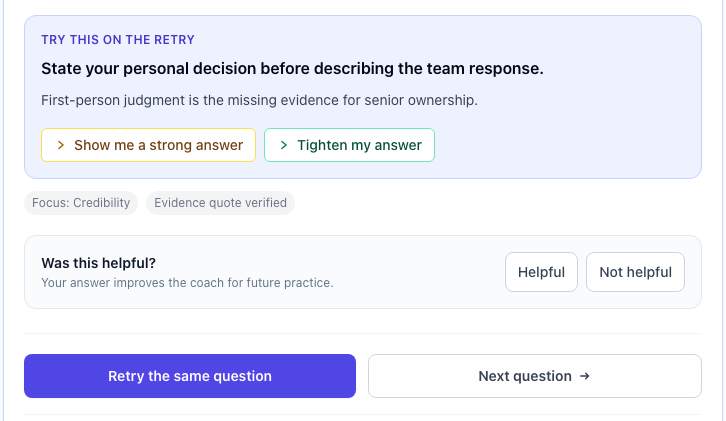
Use the next four minutes to find one omission. Perhaps you explained the team's work but never named your decision. Retry with that decision near the beginning. Spend four more minutes answering a new follow-up: “What information would have changed your mind?” This checks whether you understand the example beyond a memorised sequence.
Use the final four minutes to check equipment and instructions. If you expect video, record a separate short clip using your own camera software and review sound, framing and readability. Keep this separate from Coach: Coach's published practice workflow uses spoken answers and does not record video.
Use Coach for feedback before the assessment
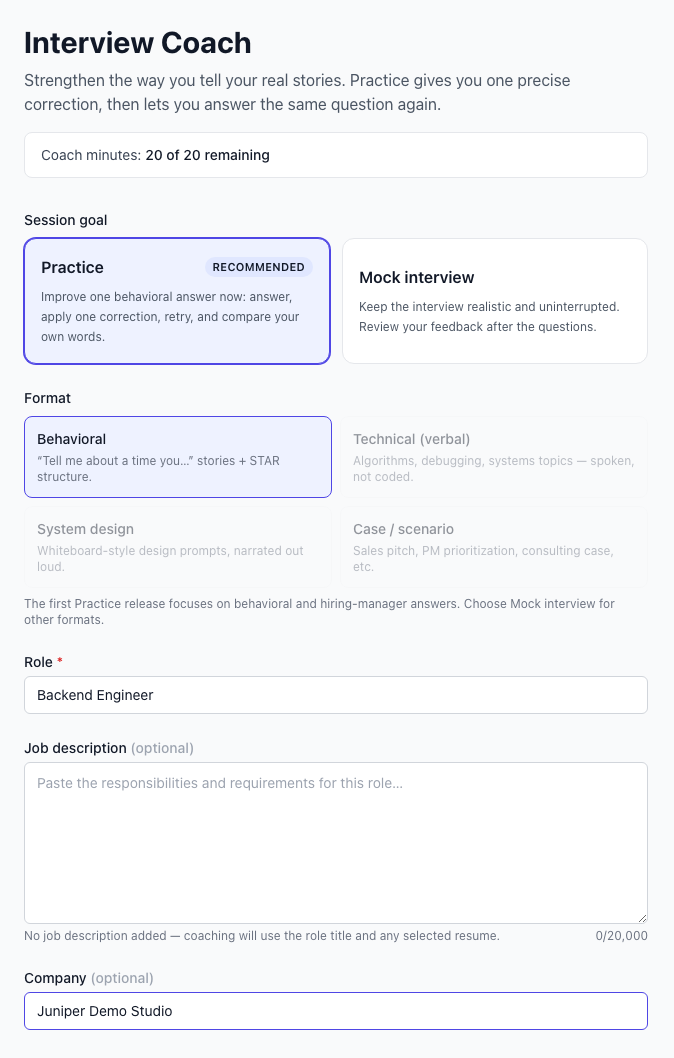
Interview Copilot's Coach asks questions and gives feedback on answers you say aloud. In behavioral and hiring-manager Practice mode, you receive one focused correction and one retry of the same question. Mock interview mode continues through the interview and gives feedback afterwards.
Add your role, and optionally a résumé or job description, when setting up practice. Choose one correction to work on, then try a fresh question after the retry. A stronger repeated answer is useful practice evidence; it does not establish readiness for every question.
The Free plan includes twenty Coach minutes each month. Only answer-recording time counts; reading feedback does not. Coach does not simulate any employer's screening platform, record video, score your camera presence or predict a hiring decision. Use it to rehearse your own explanation before the assessment, within any applicable rules on preparation materials.
Frequently asked questions
What is an AI-led screening interview like?
Start with the invitation: it may describe recorded responses or a spoken exchange. Confirm the required equipment, time limits and allowed materials rather than assuming every provider uses the same format.
How should I prepare for a Mercor AI interview?
Read Mercor's current guide, test the required devices and use its practice option if useful. Follow its AI-use rules and give your own responses during the assessment.
Where can I find micro1 interview preparation?
micro1 publishes a role-based practice page with AI interviews and feedback. Use it as preparation; check your invitation separately for assessment requirements.
Can Coach practise my video delivery?
Coach listens to spoken answers and does not record video. Use a separate camera rehearsal to check framing and sound, without treating either exercise as the employer's scoring system.
Can I use live AI help in the screening?
Check and follow the employer's rules. Do not use live help where it is not allowed. This guide recommends practice before the assessment, followed by your own answers.
Start practicing free. After you sign up, choose Practice with Coach on your dashboard to rehearse before the assessment. See Interview Copilot for the product overview.