
Alternatives to Interview Coder include Final Round AI, Verve AI, ParakeetAI and Interview Copilot, with different workflows for coding questions and preparation. Choose by whether you need help with an on-screen problem, guidance on a spoken question or practice explaining your own solution.
This comparison is written by the makers of Interview Copilot. We checked the vendors' public pages on 24 November 2026; the descriptions below are published capabilities, not results from testing their apps. Check and follow the employer's rules before using assistance.
What Interview Coder is, and who it is for
Interview Coder describes itself as a desktop app providing real-time help with technical and coding interview questions. Its page description specifically names LeetCode interviews, while its current site also markets system design, behavioral interviews and other interview types. Coding candidates are a central audience, but its published scope extends beyond coding.
Its homepage describes capturing and transcribing interviewer audio. The free offer is a download for exploring the app without a card. Its FAQ says AI features require a paid plan: a free download should not be read as free AI answers.
The same page displays Monthly Pro at $299 per month with 1,000 usage credits, and Lifetime Pro at $799 once with unlimited lifetime access. Those are the displayed offers, without a checkout test. We have not established a conversion from credits to interview minutes, so we do not calculate one.
A shortlist based on the coding workflow
Checked on .
| Product | Published coding workflow | Free access established from the source |
|---|---|---|
| Interview Coder | Desktop technical-interview assistance and interviewer-audio transcription | Download and explore without a card; AI features require a paid plan |
| Final Round AI | Screen Help uses visible coding prompts as context; desktop app for Windows and macOS 14.4+ | Goal setup and preparation materials; live sessions require Pro |
| Verve AI | Captures screen problems or supplied screenshots; offers coding follow-ups | Pricing lists three 15-minute Copilot sessions a month and five mock interviews, with no card required |
| ParakeetAI | Listens for coding questions and reads code shared on screen, with code suggestions and explanations | First mock interview free; the page also offers a free start without a card |
| Interview Copilot | Coding mode and live guidance for a spoken programming question; separate spoken Coach practice | Free plan: 20 Copilot minutes and 20 Coach minutes each month, no card |
These offers use different units: a download, sessions, a first mock and monthly minutes. They are starting conditions, not equivalent quantities of coding help. ParakeetAI's sample dashboard is not used here as evidence of a free live-session allowance.
Final Round AI: when the prompt is on screen
Final Round's product page describes Screen Help using a visible coding prompt as answer context. Its coding page also describes algorithm suggestions, debugging help and time and space complexity explanations. This makes it relevant when comparing screen-based technical workflows. Its Pro plan is required for live sessions, with no free trial; our Final Round AI comparison covers its billing options. Check access and permissions for your device separately; this page has not tested code correctness or session performance.
Verve AI: captures and coding follow-ups
Verve's coding page describes direct screen capture, screenshot input and multiple images for longer questions. It also describes automatic detection of spoken follow-ups and quick actions for explanation, debugging or alternatives. Those are useful distinctions if a problem arrives as text and then changes during the conversation.
Its pricing page advertises Standard from $16.99 per month with annual billing. The Standard session allowance conflicts between its card and table, so we leave that entitlement unresolved. Our Verve comparison covers the broader workflow.
ParakeetAI: coding alongside call guidance
ParakeetAI's homepage describes both listening to a coding question and reading code on screen. It also advertises automatic question detection and answer suggestions. Its Interview Assistant offer displays $149.90 billed monthly, alongside other billing and credit options. For the wider purchase and access comparison, read Final Round AI vs ParakeetAI.
Interview Copilot: spoken guidance and rehearsal
Interview Copilot's coding guide explains guidance from a spoken problem, answer formats and a worked solution. Manual Get Answer is available on every plan; Basic and Intensive add optional Auto Answer. Cue me supplies short points, Structure it supplies an outline, and Formulate my answer supplies first-person wording.
Copilot works from the spoken question: the coding guide does not promise access to a screen-only prompt, an editor or a test runner, and it makes no code-execution claim. Coach's technical practice is verbal and has no code editor. If either screen capture or running code is essential, resolve that requirement before choosing this workflow. See setup for the documented audio routes.
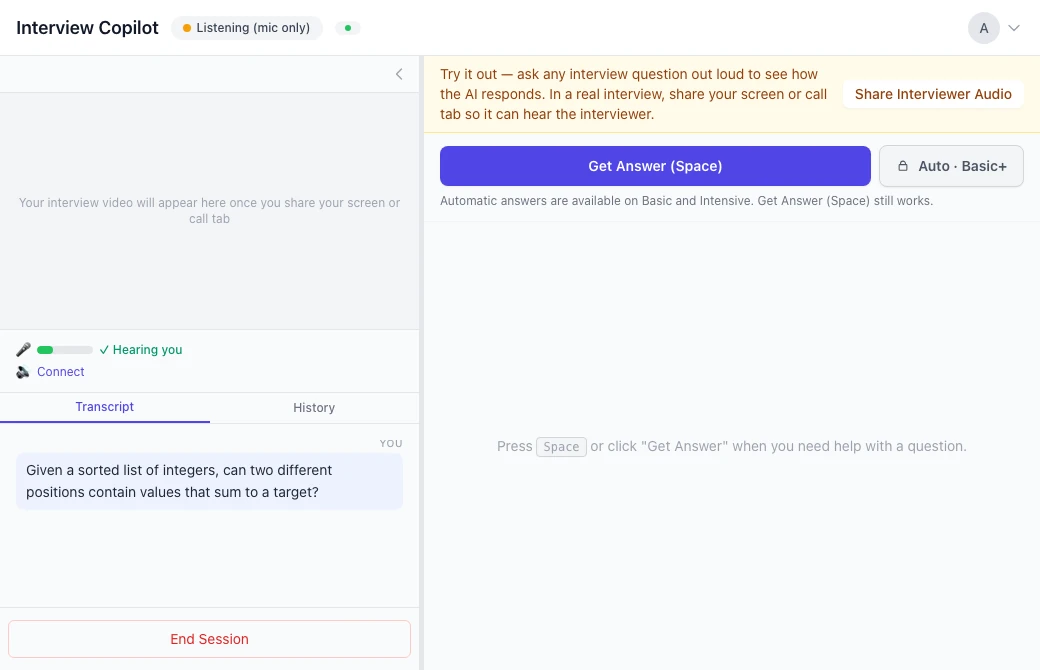
For preparation, Coach lets you practise a technical explanation aloud. Behavioral and hiring-manager Practice mode separately offers one correction and a same-question retry. Paid plans start at US$14.99 monthly; pricing keeps Copilot and Coach allowances separate.
A three-part coding check
This is an original comparison exercise, not a captured product answer. Use it in permitted preparation with any tool you are considering.
First, say the whole problem aloud: “Given a sorted list of integers, can two different positions contain values that sum to a target?” Ask for an approach and the assumption it depends on. Two pointers can scan a sorted list in linear time with constant extra space.
Next, present a written follow-up without reading it aloud: “Duplicate values are allowed.” This distinguishes a screen-input requirement from an audio-only question. Check whether the suggested reasoning allows [3, 3] to reach six while rejecting the single-element list [3].
Finally, remove the sorting assumption. Ask what must change. A set of previously seen values is one possible approach; continuing the original pointer argument without checking ordering misses the changed contract. Record separately whether the tool received the prompt, addressed the change and gave reasoning you could explain. None of those observations substitutes for running your implementation's tests.
Frequently asked questions
What are alternatives to Interview Coder?
Final Round AI, Verve AI, ParakeetAI and Interview Copilot are options in this shortlist. Their published workflows differ, particularly around screen input and spoken preparation.
Is Interview Coder free to use?
Its site offers a free download without a card, but says AI features require a paid plan. We have not verified a free AI-answer allowance.
Does Interview Copilot execute my coding solution?
Don't plan on it. The coding guide covers guidance on a spoken problem and makes no code-execution or test-runner claim, and Coach technical practice is spoken, without a code editor. Run and test your solution in a coding environment the interview permits.
Can I use these tools to prepare before an interview?
Several publish practice options, with different free terms shown above. Interview Copilot includes Coach on every plan. Keep coding implementation practice separate from rehearsing a spoken explanation.
Where can I compare Interview Pilot too?
Use the existing Interview Pilot comparison. Interview Pilot and Interview Coder are separate products; this shortlist focuses on coding workflows.