
A Mercor AI interview is a recorded conversation in which Mercor's AI interviewer asks role-specific questions, creates a transcript of your answers and evaluates your performance for the listing. Mercor says most interviews take about 20 minutes. Prepare by taking Mercor's free Practice Interview, testing your camera and microphone on a computer, and rehearsing spoken answers about your own experience.
This guide summarises Mercor's public candidate help pages and a small number of candidate reports. Checked on . Mercor can change its process, so read the instructions in your own invitation and waiting room before you start. Check and follow Mercor's rules for your interview.
What Mercor says the AI interview is
According to Mercor's AI Interview help page, the interviewer poses questions for the role, generates a transcript and evaluates your performance for that listing. Most interviews take approximately 20 minutes, although some are shorter or longer.
Each unique interview only needs to be completed once. If another application requires the same interview, Mercor keeps your existing result. That makes the first attempt more important than it might look: the same result can follow you into later applications.
The help page also says interviews differ. Some are technical and require deep discussion of prior experience; others test language or reasoning skills. Interviews are conducted in English unless the listing says otherwise. Some include screen sharing (full-screen only) or a whiteboard, whose content saves automatically.
Mercor retains video and audio recordings and an AI-generated transcript of official interviews to evaluate your candidacy and recommend your profile to employers. It says practice interviews are not shared with any companies, and it does not share recordings or transcripts with candidates.
Setup Mercor asks for
Mercor's published tips and requirements, in short:
- Use a computer with a working camera and microphone, and test both before starting. Some interviews need a computer and will not run on a phone.
- Chrome (latest version) is recommended. Edge and Safari are supported; Firefox is not.
- Keep your full face visible and your voice clear. A quiet room and a stable connection are expected; headphones and an external microphone are recommended.
- Captions are on by default and can be turned off.
- Have pen and paper, and a calculator if relevant.
- You do not have to start immediately. Choose a time that works for you.
- Long silences may prompt the AI to interject. If it interrupts after a pause, you can tell it you weren't finished. If it talks over you, keep answers brief and ask it to repeat or clarify the question.
The waiting room has a Setup checks tab and a Play test sound button for your speakers. Use them rather than assuming your call setup from another app will carry over.
Practice Interview and retakes: read both lines
Mercor offers a free Practice Interview. Its help page says it is not tied to any application, does not affect future opportunities and can be taken as many times as you like. It is the closest rehearsal of Mercor's own format, so take it first.
The retake guidance needs care, because the same help page says two different things:
- "you can retake your official AI interview up to three times if you'd like to strengthen your responses before submitting an application";
- "The interview waiting room asks you to reserve retakes for technical issues and notes that hiring managers can see your retake count. A retake also resets your application progress."
We do not choose between them. Plan to give your answer on the first attempt, treat a retake as a fallback for a technical problem, and read what your own waiting room says on the day.
AI tools and sharing questions
Mercor's FAQ points candidates to its LLM Usage Policy and asks them to "refrain from utilizing large language models to compose your responses, rate model responses, generate rationales or explanations, or evaluate code." Follow that rule. Give your own answers in the interview, and keep any AI help to rehearsal beforehand.
Mercor also asks candidates not to share specific questions, screenshots or confidential information online, while allowing general discussion of the experience. For that reason this page does not list Mercor questions. It describes the types of question candidates report and how to prepare for each.
What candidates report
Candidate accounts are few and dated, so treat them as examples, not rules.
- A GeeksforGeeks write-up from May 2024 describes "an 25 minute interview on basis of my submitted resume", in which the AI "cross-questioned me on basis of my answers" about the candidate's internship, projects and technology choices.
- A Glassdoor review from a subject matter expert, seen in search results (Glassdoor blocked our reader), describes follow-up questions that went deeper into their answers about their work.
The common thread: questions start from your résumé and follow up on what you say. Expect to be asked why, not only what.
How to prepare, by question type
Your background. Expect "walk me through" questions about roles and projects on your résumé. For each project, prepare four facts: the problem, what you personally did, why you chose that approach and what happened. Keep measured results separate from impressions.
Technical depth. For a technical listing, practise explaining one decision and one alternative you rejected, and the condition that would change your mind. A follow-up such as "how would you handle that failing?" is likely when you name a tool.
Reasoning or language. Some interviews test reasoning or language rather than domain depth. Practise thinking out loud: state your assumption, give the answer, then say how you would check it.
Follow-ups. Because the interviewer reacts to your answer, practise a second, shorter answer to "can you give a specific example?" or "what would you do differently?".
Keep answers to roughly one to two minutes. Mercor itself advises brief answers and warns that long silences may prompt the AI to interject.
Practise with Coach before your Mercor interview
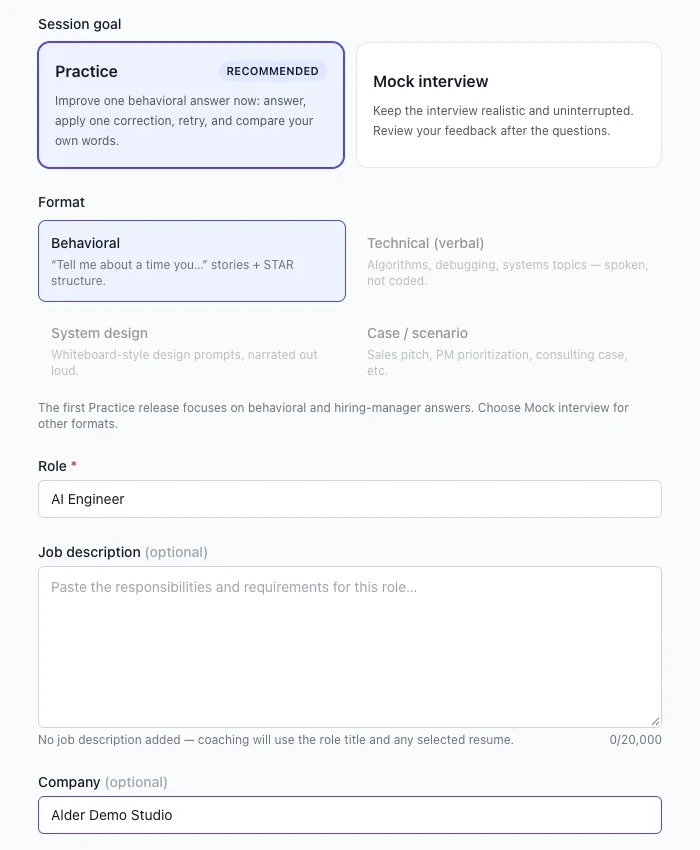
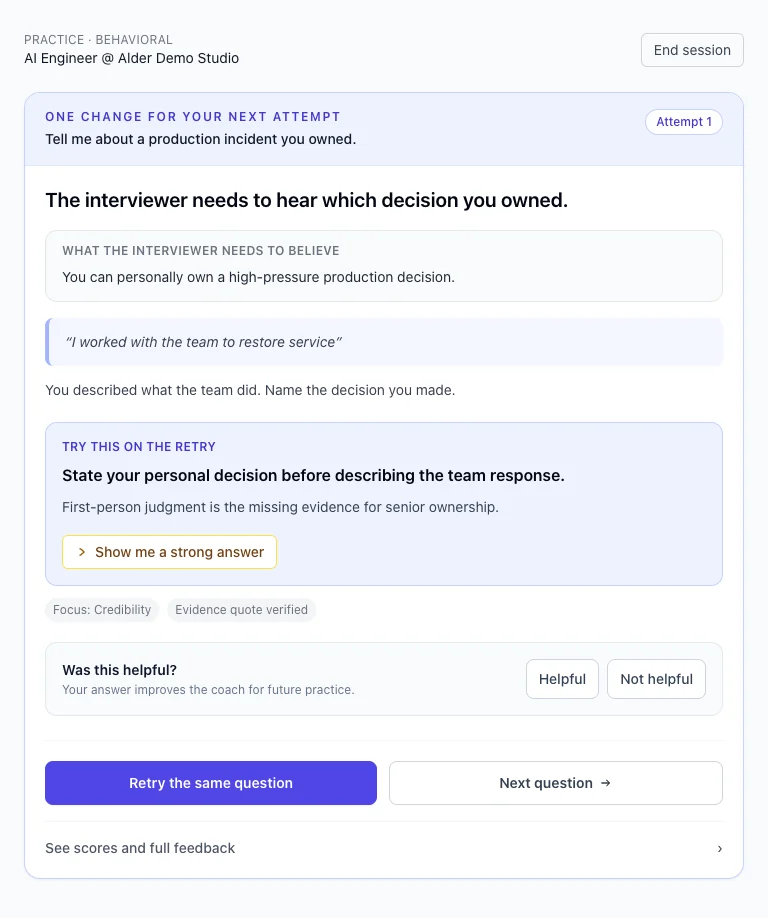
Interview Copilot's Coach is for rehearsal before the interview, not during it. Enter the role from your Mercor listing; a résumé and job description are optional. Coach asks likely questions for that role, you answer aloud, and each answer is scored 1–5 on substance, structure, relevance, credibility and differentiation.
In behavioral and hiring-manager Practice mode, you get one focused correction and one retry of the same question. Mock interview mode keeps going with follow-up questions and gives feedback after the last one, which is closer to the résumé-driven follow-ups candidates describe.
Coach does not simulate Mercor's platform, record video or predict Mercor's evaluation. Free includes 20 Coach minutes a month with no card, and only answer-recording time counts. Use Coach to tighten your stories, then take Mercor's own Practice Interview to check the real format. For other company AI interviews, see our AI interviewer guide.
Frequently asked questions
How long is a Mercor AI interview?
Mercor says most interviews take approximately 20 minutes, though some are shorter or longer. One 2024 candidate report describes a 25-minute interview.
Can I practise the Mercor AI interview?
Yes. Mercor offers a free Practice Interview that is not tied to an application, does not affect future opportunities and can be repeated. You can also rehearse spoken answers with a general practice tool beforehand.
Can I retake a Mercor AI interview?
Mercor's help page says you can retake an interview up to three times, but also that the waiting room asks you to keep retakes for technical issues, that hiring managers can see your retake count and that a retake resets your application progress. Read your own waiting room's instructions.
Can I use ChatGPT during a Mercor interview?
Mercor asks candidates to follow its LLM Usage Policy, which says not to use large language models to compose responses, rate model responses, generate explanations or evaluate code. Give your own answers in the interview, and use AI tools only to rehearse beforehand.
What equipment do I need?
A computer with a working camera and microphone, a quiet room and a stable connection. Chrome is recommended; Edge and Safari are supported; Firefox is not.
Start free. After you sign up, choose Practice with Coach on your dashboard and enter the role from your Mercor listing. See Interview Copilot for the product overview.